Jim Bray's Car & Tech rants - publishing online exclusively since 1995

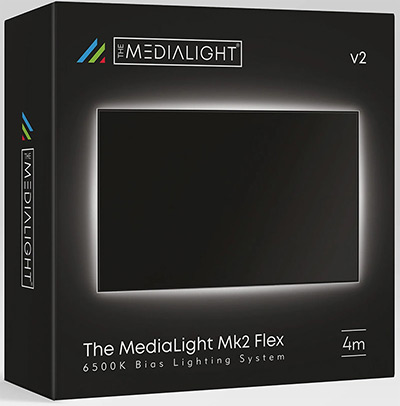
Bias Light and setup disc set can enhance your home theatre enjoyment – and an IPTV updateBy Jim Bray Have you been watching your flat screen TV in a darkened room and found it a tad dazzling on your eyes? If so, you may be a prime customer for something called a bias light, an interesting and handy technology that can take some of that dazzle away and help make your flat screen purchase even more enjoyable. And if you want to ensure your 4K TV is performing up to its best, you can partake of setup discs such as the Spears and Munsil one I've been checking out for the past couple of weeks. A bias light is designed to be used in a dark room, which ideally is how you should watch a panel, anyway, practicality allowing. This, according to the Spears and Munsil disc's documentation, is how the screens are set up in the mastering suites where the content is made ready for production "to provide a known quantity of light at a known white level." Sure, you could turn on more room lights to combat the eye-tiring dazzle, but that can create other problems – such as having room lights reflecting onto the screen, which isn't good because it causes a loss of contrast and black levels, which are some of the most important parameters in picture quality. It could also introduce glare. The bottom line is that by "washing out" your TV's picture with external lighting, you aren't getting the most out of your TV purchase. You might be able to read while the TV's on, but that kind of defeats the purpose of watching something. But a bias light raises the light levels in your viewing area without either shining a light toward your eyes or toward the screen itself. Basically, you get some of the benefits of room lighting without the drawbacks. This isn't just gobbledegook, either. I've been using bias lights for years, since they were actually small fluorescent tubes that attached to the back of your big screen. I had a 57-inch rear projector then, which had a big enough cabinet that you could screw the thing right to it – though I usually mounted it on the wall behind so I could use it when testing other televisions. Since then, technology has marched onward and now bias lights (available, as is the Spears and Munsil Ultra HD Benchmark from MediaLight) are made with tiny LED's that not only use very little electricity, but which really do help make your flat panel look more realistic while being easier on your eyes. And as with most technology, the LED bias lights have evolved over the years since I first reviewed a version back in 2018. According to the company, with the MediaLight Mk2 v2 "we've refined everything that made the original an essential part of your viewing setup, focusing on the details that matter most to our users." To that end, they've done stuff like expanding the dimming range (to 150 "flicker-free levels"), and increased the efficiency of the circuitry so it performs better in more user environments. "We also listened to your feedback on installation, including a new residue-free nano tape option that's easy to remove without leaving marks. It's a nice upgrade. The last bias light I tested from these people came with little plastic mounting hooks you could glue to the back of your flat screen for permanent installation. It worked fine, though since I review different TV's periodically, I preferred just using masking tape to make removing the light and installing it temporarily on a test unit easier. It worked fine, too. But now, that nano tape option gives you the best of both worlds. Here are some of the features the MediaLight folk extoll:
The company sent me the MediaLight Mk2 Flex 6500K system in a four-metre length. That let me put the LED strip around all four sides of the OLED's rear panel, whereas my earlier one was only long enough to string horizontally near the top of the back panel. The earlier installation worked fine, but the four metre one (and you can get up to seven metres in length) makes for what appears to be a more even glow onto the wall behind the TV. The light plugs into a USB port of the TV for power, and it also comes with an infrared remote control and sensor so you can turn it on and off and tweak the brightness without having to leave your easy chair. As an extremely lazy person, I liked this! You can also plug it into the wall by using a USB adapter. You can choose lengths for the Mk2 Flex of one metre ($81.96 CAD) up to seven metres ($194.95 CAD), in one metre increments. I think those prices are quite reasonable considering how the light enhances your enjoyment when the room is dark (and it should always be dark!). So, it should come as no surprise that I recommend bias light technology highly. Heck, MediaLight even offers a five-year warranty. 
While a bias light is great, what's the point of tweaking your room if your TV isn't calibrated to its best as well? And that's why, if you take your ultimate video quality seriously, you need a setup disc such as the Spears and Munsil. I've used such discs in the past, from a competitor, but only ones that were set up for high definition and, before that, DVD, so obviously I was very interested to see how a real 4K UHD disc would perform on today's equipment. And wow, is this a high-end product! Previous discs I tried fit onto a single disc, but the $79.95 CAD Spears and Munsil Ultra HD Benchmark spans three discs and can be intimidating as all get out if you aren't comfortable messing about with your TV's settings. Fortunately, it also comes with an excellent manual – though with type so small I had trouble reading it even with my glasses on – that not only walks you through the calibration processes but which also gives you insight into what you're doing and why. There's even a section on why you should use a bias light. So, I guess the manual isn't unbiased… The documentation also has some advice on choosing equipment and how to set it up – heck, it even mentioned my Oppo UHD player as a fine reference unit even though Oppo left the north American market several years ago. You'll also get the inside scoop on what the terms 4K and UHD and high dynamic range really mean. And there's a panel of filters you can use to ensure your TV's colour is set to its ideal performance. Most panels I've tried in recent years are pretty good right out of the box (which wasn't always the case in days gone by) but I even found some areas to tweak on my new OLED. This was a tad annoying, since OLED should be darn near perfect out of the box, but it's also dependent in part on your room's ambient lighting (oh, oh, back to the bias light again!) and other things. Here's a list of some of the package's features, according to the distributor's website:
There's more on these three discs than the average consumer will need or use, but better to have too much than get inflicted with a half-buttocked package, right? And this is definitely not that! The menu system is a tad hard to fathom, but once you realize how it's been set up you should be okay. The Spears and Munsil disc set is extensive, fascinating and even quite a bit of fun. It can also be quite intimidating, but if you screw something up you can always do a reset on your TV (from the TV's menu) and start from scratch again. And don't forget to do your tweaking when the room lighting is optimal (dark). Calibrating your TV isn't for everyone, and you may be more comfortable hiring a professional, but if you feel like an interesting challenge – or just have a hankering to find out more about your panel and how it works – this disc can give you plenty of interesting pleasure as well as teaching you a lot about how to ensure the after-tax dollars you spent on your TV are spent as wisely as possible. Between the bias light and the Spears and Munsil, you're going a long way toward optimizing your video experience. In concluding this piece, alas, I must pass along an unhappy update to my three IPTV columns from earlier this year.: Alas, as of this writing it looks like another provider has bitten the dust. IPTV.CA, which I have recommended in this series as the best I've used, appears to have gone dark. It's been about three weeks now since my playlist with them stopped working - about a month after I reupped for three months - which means they kept my money and left me (and their other customers, I suppose) in the lurch. Alas, their website still works and is still trying to lure people into their lair. Repeated contact efforts on my part have all been ignored. It's a darn shame. I've since signed up with another provider that claims to be Canadian - signing up for a month which is more expensive than a longer term deal, but which means I'll lose less if/when they disappear as well. Their playlist works, but is a lot slower and some of the content is different - for example, I've been revisiting Babylon 5 and the old playlist had it in widescreen, surround sound. The new one is 4x3 and stereo. And that's just one example. But at least it works, so far. So, my advice for IPTV customers is to only sign up for a month at a time. I still love IPTV, when it works, and it's still cheaper and more flexible than cable or fibre and you'll be out less money if they disappear. Copyright 2026 Jim Bray |