
|
|


TechnoFILE is copyright and a registered trademark © ® of
Pandemonium Productions.
All rights reserved.
E-mail us Here!
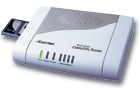
Actiontec Brings Wireless Networking HomeBy Jim Bray Home networking is becoming increasingly popular for people who want to share an Internet connection, files, or game play. But what if your home doesn't lend itself to running a bunch of wires to hook your computers together? Fortunately, there are alternatives, including networks that use your home's telephone wires or electrical wiring. In our home, the main high speed Internet connection is in the basement, whereas my office is one level above and there's yet another PC on the top level. Add to that a couple of notebook computers that could be anywhere, and the need for tying all the PC's together becomes obvious. And since running wires just isn't practical in our home, and my earlier test of a "phone line" network solution left us unsatisfied, a wireless solution would seem to be ideal. There are a few of these available, but one of the first companies out of the box with such a home network solution was Actiontec Electronics, who were kind enough to send us some of their products to try. And though we had some problems getting everything configured for our unconventional installation (a customized network designed and created for us by my computer scientist son), they appear to be doing the job well. They aren't the be-all and end-all for our home networking needs, for a variety of reasons including operating systems, but depending on your requirements and your existing setup, they might do the job for you. The Actiontec equipment included their $105 wireless-ready cable/DSL router and a selection of their 802.11b wireless PC cards, which also sell for $105 each. They also kicked in a wireless PCI card that goes into an expansion slot inside a PC. The router not only acts as the network hub, but also connects you to the Internet. The latter products link your PC's. 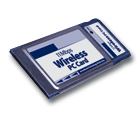
One thing you should know going in, however, is that the router's rating of "wireless ready" means exactly that: unless you buy one of the wireless PC cards for it it's just a garden variety router. Not that there's anything wrong with that, of course but you should be aware of this fact lest you come home with the router and then wonder why it doesn't work wirelessly. Actiontec promotes the system's ease of use and it does seem quite straightforward. We already had a wired home network before the Actiontec stuff arrived, however, and as hinted at above getting it to work seamlessly with what we already had caused us some angst. This might not be the case if you were starting from scratch, and the system seemed to work fine when we tried it in another home environment that wasn't already a maze of cables and electrical doodads. Part of our problems stemmed from our network's Linux operating system, which the Actiontec products don't support (though Linux-compatible cards work fine with the Actiontec system). Actiontec's products are designed for use with Microsoft Windows 9x - XP and Mac OS 7.1 and newer - which is certainly the lion's share of the marketplace right now - but my son chose Linux for our server a long time ago and we weren't about to rebuild everything. Anyway, the router is the heart of the system and Actiontec's model comes with two PCMCIA card slots - one to hold the wireless PC card and the other for a variety of PC card-based expansion choices including, according to Actiontec, Bluetooth. It also includes a basic firewall to help prevent your network from outside hack attack and is configurable via a Web-based management interface. It comes with four auto sensing 10/100Mb switched ports and a 10BASE-T Ethernet port for Internet access. It supports IP, TCP, UDP, NAT, PPPoE (client) DHCP (client and server) TFTP, HTTP, POP3 and SMPT protocols and PPTP & L2TP Virtual Private Networks. How's that for a blizzard of acronyms? Actiontec says you can hook in up to 35 computers, which could also make the system attractive for small office environments. The PC and PCI cards offer transfer speeds of up to 11 Mbps (megabytes per second), which isn't up to the 10/100 Mbps speed of the router network, but since most Internet Service Providers in the real world don't offer more than 2 Mbps throughput, the Actiontecs' speed should be more than adequate for most everyday use. And I noticed no problems with it in my everyday use. Using the wireless networking cards is straightforward once you've installed the drivers (from the included CD-ROM) and configured the network. In fact, you never really notice you're using them since they just sit there sticking out of the computer like an impudent tongue. We ended up leaving my main home office PC networked with wires because the Actiontec didn't cut it with the amount of throughput I have and we suspect there were some interference problems from the abundance of electrical devices in my office (heck, I even have an old fashioned record turntable hooked in as I write this!). It worked fine in my son's room upstairs, however, and in my notebook computer with which, thanks to the wireless network, I can now access files or surf the Internet from anywhere in the house. And that's the whole point of such a product. Jim Bray's technology columns are distributed by the TechnoFILE and Mochila Syndicates. Copyright Jim Bray.
|
|
|
|
|

| Support TechnoFile via Paypal |
| TechnoFILE's
E-letter We're pleased to offer our FREE private, subscription-based private E-mail service. It's the "no brainer" way to keep informed. Our Privacy Policy |