
|
|


TechnoFILE is copyright and a registered trademark © ® of
Pandemonium Productions.
All rights reserved.
E-mail us Here!
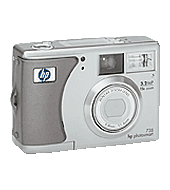
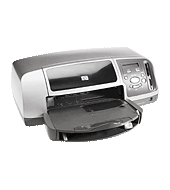
HP Digital Duo Promises Perfect PicturesBy Jim Bray Now that film is virtually dead, can the PC be far behind? Well, yes, but that rather misleading lead does indicate that you don’t necessarily need a computer to look at your digital pictures. HP has been offering Photosmart printers for a couple of years now, printers that take your digital camera’s input and output prints directly - whether the camera’s connected to it via USB, or media card. I’ve just played with a pair of these beasties and they clearly show how the state of the art is moving along. The Photosmart 735 digital is a 3.2 megapixel unit that puts a lot of punch into a small package. A relatively inexpensive one, too. Retailing for about $250US, the 735 offers an effective resolution of 2088 x 1550 pixels. This is more than adequate for most consumer applications, and in fact is too large for effective e-mailing (fortunately, you can “dumb down” the resolution if you want to - and depending on how many shots you’re taking or how much memory you have, you may want to).
HP’s Instant Share is kind of neat. All you have to do is take a photo and then, on the back of the camera, chose who to share it with at the push of a button. Later, when the camera is hooked into your PC (or that optional camera dock, according to HP), the photos you chose are automatically e-mailed and/or printed. How’s that for no brainer? Incidentally, that 3.2 megapixel size isn’t just for printing high resolution snapshots; you can print at up to tabloid size (11x17 inches) and still have it not come out looking pixilized. The zoom works well; optical is still better than digital, but the digital’s getting pretty good these days, too. And, as is getting common now, you can “tape” (“digital?”) motion clips and sound. This can come in handy in a number of applications, including for people who want to make notes about the scene they’re shooting so they remember some facts later (insurance claim people or private detectives, perhaps?). “Tweaking” controls include sharpness, contrast, and saturation, and the software that comes with the camera lets you create and/or print photo albums and/or digital slideshows. The 735 comes with 16MB internal, which is okay, and you can expand its capacity by adding SD memory cards. I’d have liked to see one card thrown in, but such is not the case. The 1.5 inch LCD monitor on the back, as usual, seems to be right where my nose goes when I look through the optical viewfinder, so it may come in handy to have a cleaning cloth along for the ride. In all, however, the Photosmart 735 is a decent little unit. It’s a little more entry level than I’d personally like (For instance, I want a camera with interchangeable lenses because I do some “semi-professional” shooting), but if you’re just looking for an affordable and easy to manage digital camera, this one should do a nice job for you. While I had the 735, I also got to test HP’s $149US Photosmart 7350 printer. At this price this is obviously a fairly entry level machine, but rather than this meaning it isn’t very good it means it sacrifices some traditional computer printer functionality in favor of photo printing capability. One of the nicest things about this, as mentioned above, is its capacity to take the camera’s shots directly, with no PC required as an intermediary. This means that if you’re only looking to do digital shots, you can effectively do without a computer. It accepts USB and SmartMedia, Memory Stick and CompactFlash memory cards. While this probably isn’t a big deal for people who have PC’s, it does open up the world of digital photography to people who have yet to jump on the computer bandwagon (yes, there are some!). The printer offers up to 4800 “digitally fudged” dpi resolution on premium photo paper. It’s really 4800x1200 and that translates into 1200x1200 on regular paper - which is still very good. But for a hundred and fifty bucks you’d expect some corners to be cut. Here they come in speed and other capability. For instance, there’s no black ink cartridge included. It’s an extra cost option - but HP says it will also up the printer’s speed from a “best case scenario” 10 ppm to 17 ppm in black. HP claims 11 ppm color, in “draft mode” which is optimized for speed and not for quality. In my tests, I didn’t really time its printing speed, but I was reminded of “draft mode” in that I had time to go for a beer while waiting for an 8.5x11 inch sheet to print out at optimum quality. Still, the quality was excellent, so it was worth the wait. HP says the 7350 handles plain paper, Inkjet, photo, glossy, transparencies, labels, cards, iron-on transfers, and banner paper. The input tray holds 100 sheets and you can output a pile of 50 prints at a time (or 15 envelopes). This is not a printer I’d want to use in my home office for everyday printing. That said, HP doesn’t pretend that it’s such a workhorse (hence the name “Photosmart,” I daresay). It does, however, do a better job with photos than my “workhorse” inkjet printer does - though to be fair my own inkjet’s about three years old and the state of the art has moved along since then. But for printing digital pictures - and your other stuff in a pinch - it does a very good job for the price. And it’s affordable enough that those who don’t have computers can afford its entry level price. Just remember that the real costs will come when you stock it with paper and ink - though to be fair that’s the same situation with every inkjet printer. Jim Bray's technology columns are distributed by the TechnoFILE and Mochila Syndicates. Copyright Jim Bray.
|
|
|
|
|
 This handsome little beastie also offers
15x total zoom (3x optical, 5x digital), and HP’s Instant Share technology.
It also captures sound and short video clips, has some manual control options
and can be connected to a computer or TV easily - though the latter’ll
require the optional HP Photosmart 8886 camera dock.
This handsome little beastie also offers
15x total zoom (3x optical, 5x digital), and HP’s Instant Share technology.
It also captures sound and short video clips, has some manual control options
and can be connected to a computer or TV easily - though the latter’ll
require the optional HP Photosmart 8886 camera dock.
| Support TechnoFile via Paypal |
| TechnoFILE's
E-letter We're pleased to offer our FREE private, subscription-based private E-mail service. It's the "no brainer" way to keep informed. Our Privacy Policy |